Visit Japan Web: A Complete 2026 Guide for First-Time Visitors

If you are traveling to Japan, Visit Japan Web can make your arrival procedures much easier.
Visit Japan Web is an official online service provided by Japan’s Digital Agency. Travelers can register information for immigration and customs before arriving in Japan and display a QR code at the airport.
However, first-time users often have questions. Is Visit Japan Web required? Which hotel address should you enter? Can families register together? And when do you actually use the QR code?
This guide explains how to use Visit Japan Web in 2026, step by step, including registration, QR codes, customs procedures, family registration, and tax-free shopping.
- What Is Visit Japan Web?
- Is Visit Japan Web Required to Enter Japan?
- What You Need Before Registering for Visit Japan Web
- How to Register for Visit Japan Web
- How to Enter Your Hotel Address on Visit Japan Web
- How to Use Your Visit Japan Web QR Code at the Airport
- Can Families Use Visit Japan Web Together?
- How to Use Visit Japan Web for Tax-Free Shopping
- Visit Japan Web Is Free: Beware of Fake Websites
- Common Visit Japan Web Mistakes
- Visit Japan Web FAQ
- Final Tips for Using Visit Japan Web
What Is Visit Japan Web?
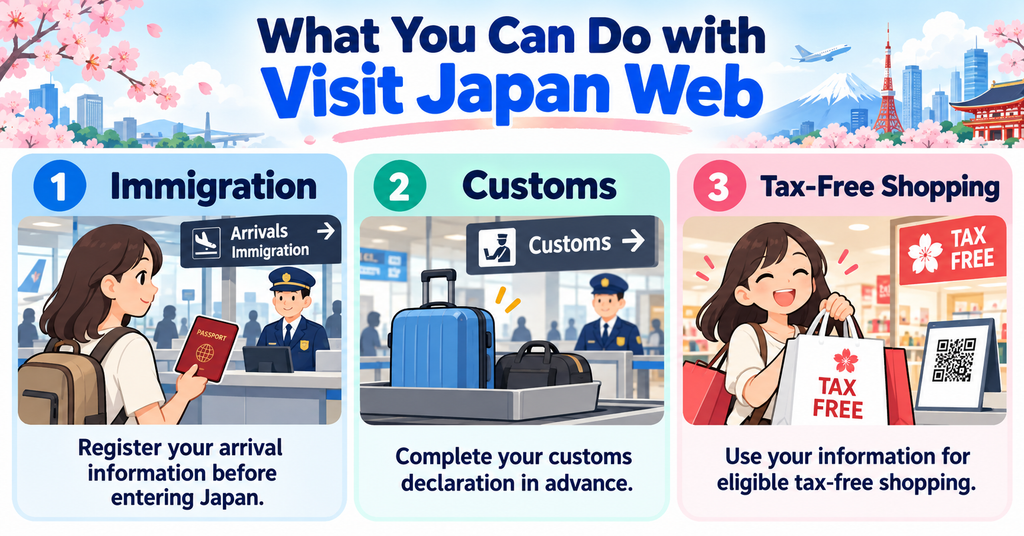
Visit Japan Web is an official web service provided by the Digital Agency of Japan.
It allows travelers entering Japan from overseas to register information needed for arrival procedures before reaching the airport in Japan.
The service mainly helps with:
- Immigration procedures
- Customs declarations
- Tax-free shopping procedures
Both foreign visitors and Japanese travelers returning to Japan can use Visit Japan Web.
For most tourists, the biggest advantage is that you can enter much of the required information before your flight instead of filling out forms after a long journey.
Visit Japan Web is not a visa and does not replace your passport or any visa that may be required for your nationality.
You still need to complete the normal immigration and customs procedures when you arrive in Japan.
Is Visit Japan Web Required to Enter Japan?
No. Visit Japan Web itself is not mandatory for most travelers entering Japan.
Foreign visitors making a new entry to Japan must provide the required immigration information, and all passengers entering Japan must complete a customs declaration.
However, these procedures do not always have to be completed through Visit Japan Web.
Japan’s immigration authorities recommend using Visit Japan Web to submit your foreign entry information electronically, while Japan Customs recommends the service for electronic customs declarations.
Paper forms are still available for travelers who cannot or do not want to use the online service.
Even though Visit Japan Web is optional, registering before your flight can make your arrival in Japan simpler because your information is already prepared.

What You Need Before Registering for Visit Japan Web
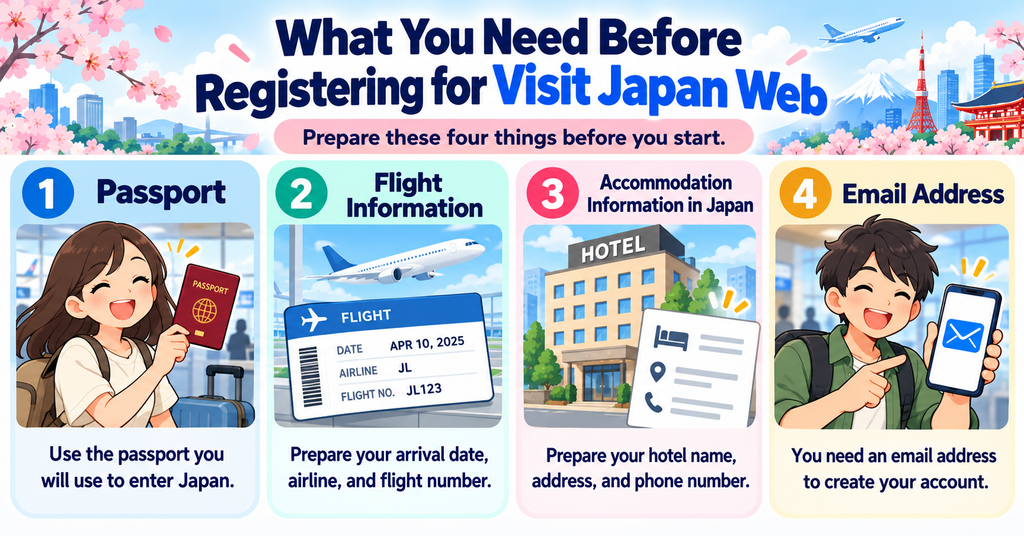
Visit Japan Web is easier to complete if you prepare your travel information before starting.
For a typical tourist, you should have your passport, flight information, accommodation details, and an email address ready.
Passport
Keep your passport nearby when registering.
Visit Japan Web asks for passport information as part of your traveler registration.
Carefully check details such as your name, nationality, passport number, and expiration date before submitting them.
The information you register should match the passport you will use when entering Japan.
If you renew or replace your passport before your trip, check your Visit Japan Web registration again and update the information if necessary.
Flight Information
Prepare the details of the flight that will bring you into Japan.
Visit Japan Web may ask for information such as:
- Your planned arrival date in Japan
- Your point of embarkation
- Your airline
- Your flight number
If you have a connecting flight before entering Japan, use the information for the flight that actually arrives in Japan where requested.
Having your airline confirmation open while registering will make this step much easier.
Accommodation Information in Japan
You will also need information about where you are staying in Japan.
Prepare the following details:
- Postal code
- Prefecture
- City or ward
- Street address
- Hotel or accommodation name
- Contact phone number
If you enter a valid Japanese postal code, Visit Japan Web can automatically fill in part of the address.
It is a good idea to keep your hotel reservation confirmation open while completing this section.
Email Address
You need an email address to create a Visit Japan Web account.
Use an email address that you can access while traveling because it will be connected to your account.
You will also create a password for Visit Japan Web.
Do not share your login information with unofficial websites or services that claim they can complete Visit Japan Web registration for you.
How to Register for Visit Japan Web
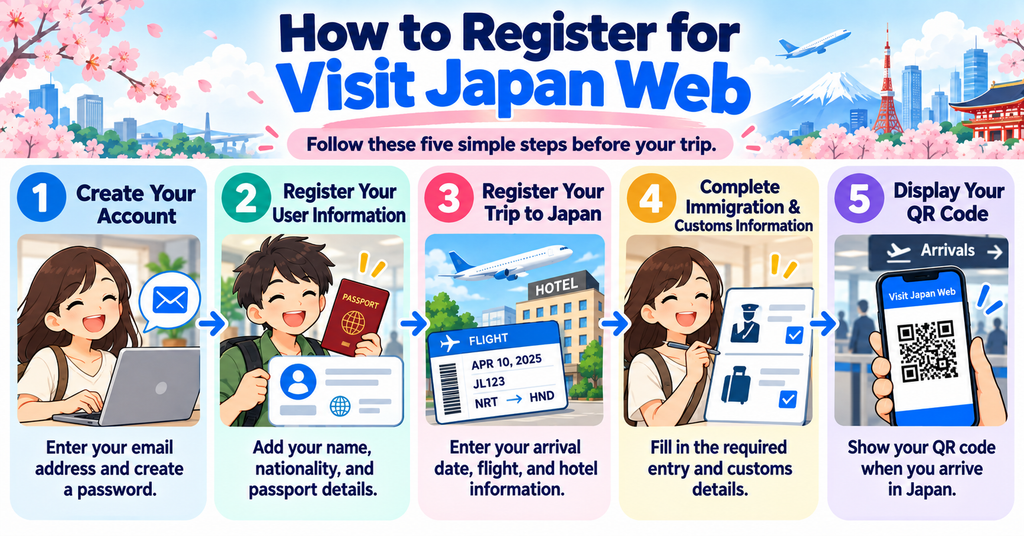
Once you have your passport and travel information ready, you can start your Visit Japan Web registration.
Always access Visit Japan Web through the official Japanese government website.
The registration process can be divided into five main steps.
Step 1: Create Your Visit Japan Web Account
Open the official Visit Japan Web website and select the option to create a new account.
Read and accept the terms of use and privacy policy, then enter your email address and create a password.
Your password must meet the security requirements shown on the registration screen.
After completing the account setup, log in to Visit Japan Web and continue to your traveler information.
Step 2: Register Your User Information
Next, register your personal information.
Enter your details carefully and make sure they match your passport.
Visit Japan Web will ask about your entry or return procedure category, such as whether you have a Japanese passport, are using a re-entry permit, or plan to use the tax-free shopping function.
Check your information carefully before continuing. Incorrect passport details can cause unnecessary problems when you arrive in Japan.
Step 3: Register Your Trip to Japan
After registering your personal information, create a new planned entry to Japan.
Enter your planned arrival date, point of embarkation, airline, flight number, and accommodation information.
You can also give your trip a name to make it easier to identify inside your account.
For example:
Japan Trip – October 2026
Check the information against your flight and hotel reservations before continuing.
Step 4: Complete Immigration and Customs Information
Open your registered trip and complete the immigration and customs information required for your arrival.
Foreign visitors may be asked about details such as their purpose of visit, planned length of stay, address in Japan, and other immigration-related questions.
You will also complete the customs declaration about the items you are bringing into Japan.
Answer every question accurately.
Since January 2024, Visit Japan Web has used a unified QR code for immigration and customs information. However, immigration inspection and customs clearance remain separate official procedures.
Step 5: Display Your QR Code
After completing the required information, open your registered trip and display the QR code for your arrival procedures.
Check that the QR code appears correctly before leaving for Japan.
You can save a screenshot as a backup so you do not have to depend entirely on airport Wi-Fi or mobile data.
Keep your passport ready as well. The QR code does not replace your passport.
When you arrive in Japan, follow the airport signs and instructions for immigration and customs procedures.
How to Enter Your Hotel Address on Visit Japan Web
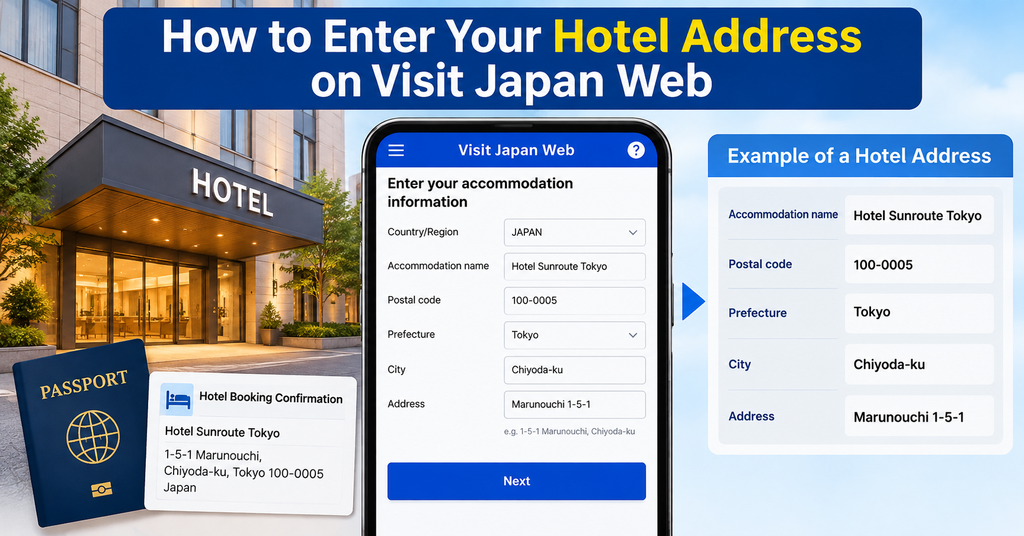
The accommodation section is one of the areas that can confuse first-time visitors.
Japanese addresses may look very different from addresses in your home country, but Visit Japan Web makes the process easier by allowing you to search using a postal code.
Which Hotel Should You Enter?
Visit Japan Web asks for an address in Japan where you will be staying.
For tourists staying at several hotels during one trip, the clearest option is to enter the accommodation where you will stay first after arriving in Japan.
Keep the hotel name, address, postal code, and telephone number nearby while completing the form.
If your first accommodation changes before your trip, update your Visit Japan Web information before arriving in Japan.
How to Enter a Japanese Address
Start with the hotel’s postal code if possible.
Enter the numbers without a hyphen and use the automatic address function. Visit Japan Web can fill in the prefecture and city when the postal code matches an address in its system.
You can then check the remaining street address and add the hotel or accommodation name.
For example, a Tokyo hotel may show:
Prefecture: Tokyo
City: Shinjuku-ku
Address: Kabukicho 1-chome-19-1
Do not worry if the order looks different from addresses used in your country. Japanese addresses are organized differently, so copying the details from your hotel’s official website or booking confirmation is usually the safest approach.
What If You Are Staying at Multiple Hotels?
You do not need to create a separate Visit Japan Web entry for every hotel you visit during the same trip.
The accommodation field is used for your address in Japan during the arrival registration.
Enter your first accommodation and make sure the information is accurate when you travel.
Moving to another hotel later in your trip does not mean you need to create a new arrival registration.
How to Use Your Visit Japan Web QR Code at the Airport
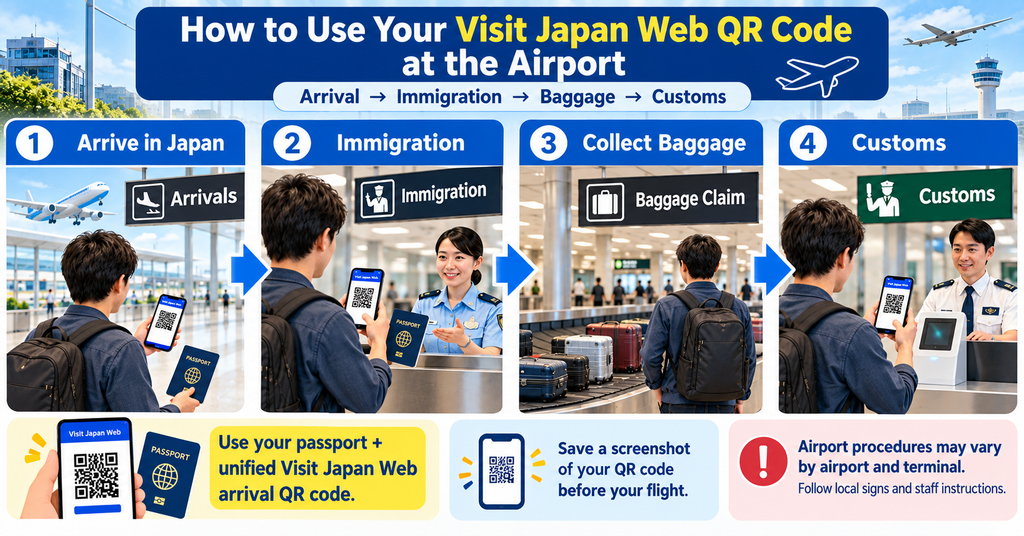
Registering online is only the first part of the process.
You will use your Visit Japan Web information when you arrive at the airport in Japan.
Before You Arrive in Japan
Before boarding your flight, log in to Visit Japan Web and check your registered trip one more time.
Make sure your immigration and customs information is complete and that your QR code can be displayed.
Saving a screenshot of the QR code is a useful backup.
Also keep your passport, flight information, and first accommodation details easy to access in case airport staff ask you to confirm anything.
At Immigration and Customs
After arriving in Japan, follow the airport signs for immigration.
Depending on the airport and terminal, you may scan your Visit Japan Web QR code and passport at a kiosk or present them as instructed by immigration staff.
Some airports now use integrated kiosks that can receive information needed for both immigration and customs procedures.
You will still go through the required immigration inspection.
After collecting your checked baggage, continue to customs. Travelers using electronic customs procedures may scan their passport and Visit Japan Web QR code at the designated equipment.
Always follow the instructions shown at your arrival airport because the exact process can differ by airport and terminal.
What If Your QR Code Does Not Appear?
If you cannot display your QR code, first check that you selected the correct registered trip and completed all required sections.
Connect to the internet and reopen Visit Japan Web if necessary.
If you changed important information after saving a screenshot, display the newest QR code instead of using an old screenshot.
If you still cannot use Visit Japan Web at the airport, do not panic.
Paper immigration and customs forms remain available for travelers who need them. Ask airport staff for assistance and follow their instructions.
Can Families Use Visit Japan Web Together?
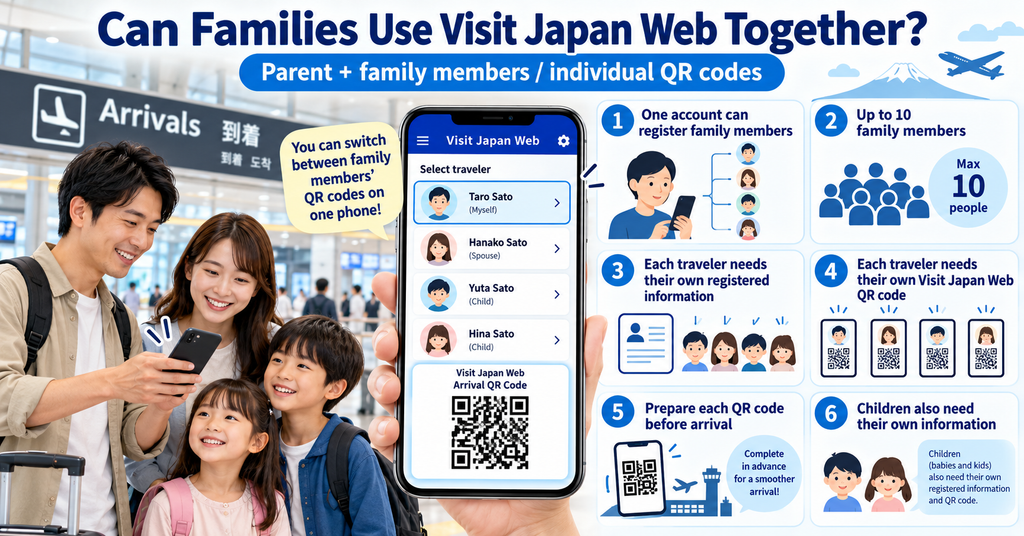
Yes. Visit Japan Web allows you to register family members traveling with you.
After registering your own information, you can add details for family members who will go through immigration procedures at the same time.
The system currently allows up to 10 family members to be registered with one account.
However, immigration procedures are still processed for each person individually.
Each traveler needs their own registered information and QR code for the required arrival procedures, including children.
When you arrive at the airport, make sure you can quickly switch between the QR codes for each family member.
How to Use Visit Japan Web for Tax-Free Shopping
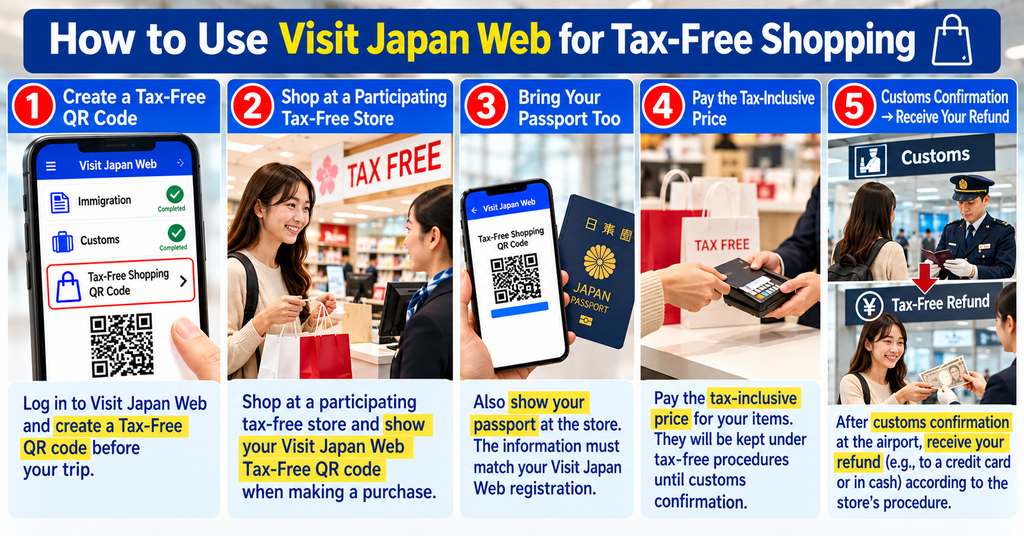
Visit Japan Web can also make tax-free shopping easier for eligible foreign visitors.
You can create a Tax-Free Shopping QR Code in Visit Japan Web and present it at participating tax-free stores instead of providing the same passport information manually.
However, not every tax-free store supports the Visit Japan Web QR code, so you may still need to show your physical passport.
Japan’s tax-free shopping system will change significantly on November 1, 2026.
Under the new refund system, travelers will generally pay the tax-inclusive price when shopping and receive the consumption tax refund after customs confirms that the eligible goods are being taken out of Japan.
At several major airports, Visit Japan Web will also be available for certain departure tax-free procedures in designated areas.
The tax-free rules are different from normal immigration and customs procedures, so make sure you understand the requirements before shopping.

Visit Japan Web Is Free: Beware of Fake Websites
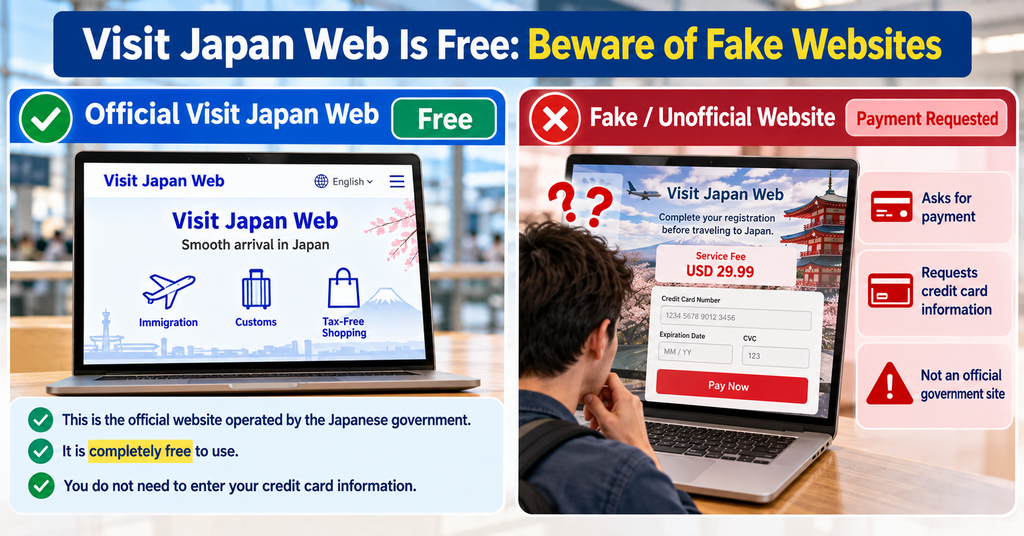
Visit Japan Web is free to use.
You should not have to pay a registration fee, QR code fee, or customs processing fee to use the official service.
Japan Customs has warned travelers about fake Visit Japan Web websites and private services that charge money to create QR codes or complete customs declarations.
There have also been warnings about suspicious apps pretending to be Visit Japan Web.
Visit Japan Web is an official web service operated by Japan’s Digital Agency.
Before entering passport or personal information, check that you are using the official Japanese government service.
Be especially careful if a website or app asks for credit card information just to register for Visit Japan Web.
Common Visit Japan Web Mistakes
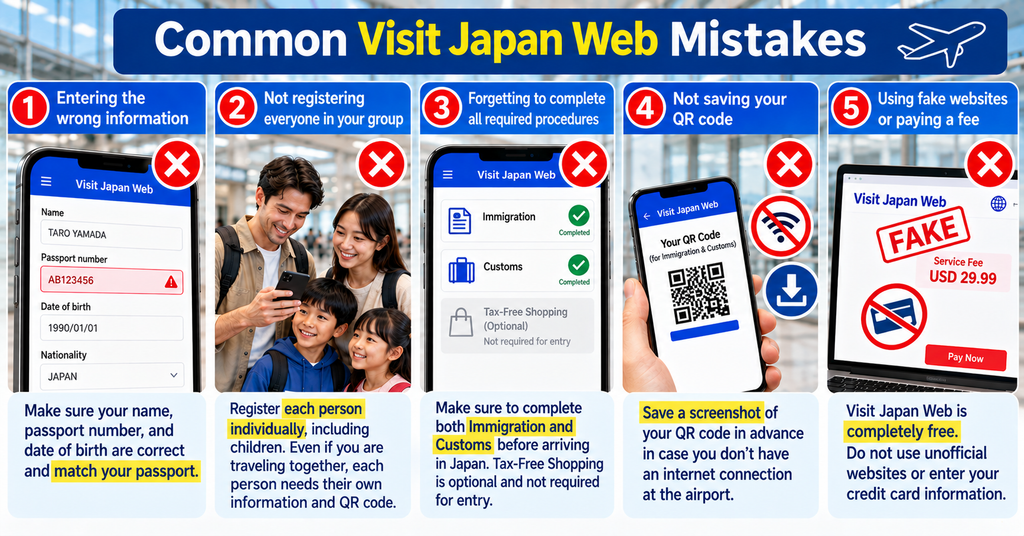
Most Visit Japan Web problems can be avoided by checking your information before your flight.
Common mistakes include:
- Entering passport information incorrectly
- Using old flight information after changing flights
- Entering the wrong accommodation address
- Forgetting to complete the immigration or customs section
- Saving a QR code and then changing your registration without updating the screenshot
- Waiting until you reach the immigration area to start registration
- Using an unofficial website or app
- Assuming one QR code can be shared by every family member
Complete your registration before traveling and compare the information with your passport, flight confirmation, and hotel booking.
A few minutes of checking at home can save confusion after arriving in Japan.
Visit Japan Web FAQ
Here are answers to some of the most common questions travelers have about Visit Japan Web.
Check these before your trip so you can avoid problems when registering or arriving in Japan.
When Should I Register for Visit Japan Web?
You do not need to wait until the day before your flight.
Once your flight and accommodation information are confirmed, you can prepare your Visit Japan Web registration.
The most important thing is to complete and check the required information before reaching immigration in Japan.
Avoid leaving everything until after you land, especially if you will not have immediate internet access.
Does Visit Japan Web Have an App?
Visit Japan Web is officially provided as a web service, so you do not need to download a third-party mobile app.
You can access the official service through a web browser on your smartphone or computer.
Visit Japan Web also provides functions that allow certain information and QR codes to be used offline after the necessary setup.
Be careful with apps that use the Visit Japan Web name but are not operated by the Japanese government.
Can I Register After Arriving in Japan?
You may be able to complete information after landing if you have internet access and have not yet completed immigration procedures.
However, this is not the best time to start.
Japan’s immigration authorities recommend entering the required information before reaching the immigration inspection area.
Completing Visit Japan Web before your flight gives you more time to check your passport, hotel, and customs information without rushing at the airport.
Do I Need Internet Access at the Airport?
Not necessarily.
Visit Japan Web provides offline functions, and immigration authorities also allow travelers to use a screenshot of the required QR code.
For the safest approach, check that your QR code works before boarding your flight and save a screenshot as a backup.
However, some Visit Japan Web functions require an internet connection, so having mobile data or airport Wi-Fi can still be useful if you need to change your registration.
Can I Use Visit Japan Web for Multiple Trips?
Yes.
You can register a new planned entry to Japan for another trip while keeping your account.
Your personal information can be reused, but you should create and check the travel information for each new arrival.
Do not rely on an old QR code from a previous trip.
Before every visit to Japan, confirm that your passport, flight, accommodation, immigration, and customs information are correct for that specific trip.
Final Tips for Using Visit Japan Web
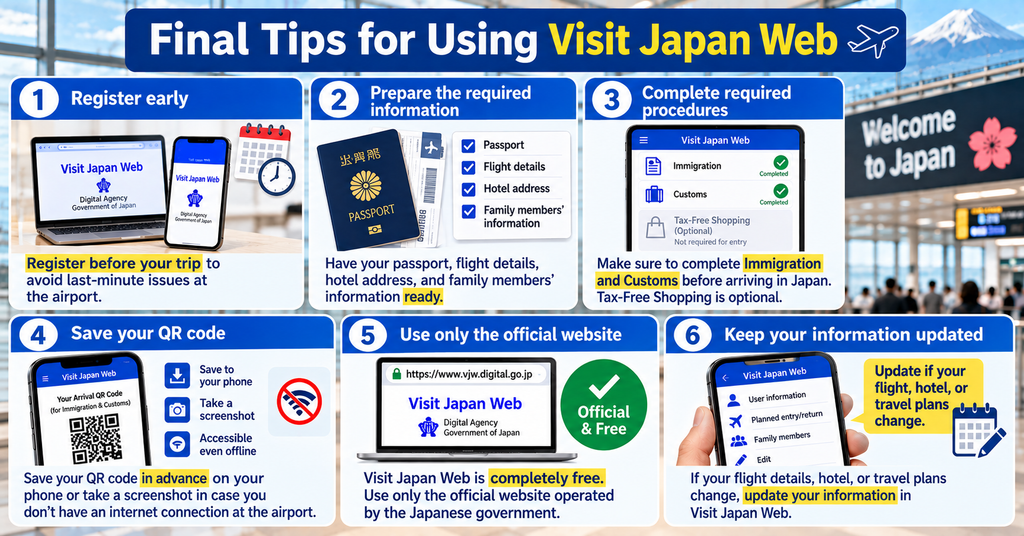
Visit Japan Web may look complicated at first, but most travelers only need to prepare a few basic things: their passport, flight details, accommodation information, and customs answers.
Complete your registration before your flight, check every detail carefully, and make sure you can display your QR code before arriving in Japan.
Save a screenshot as a backup, keep your passport accessible, and always use the official Visit Japan Web service.
If you are traveling with family, prepare the QR code for each traveler in advance.
Doing these simple steps before your trip can make your first few minutes in Japan much easier and help you move through the arrival procedures with confidence.