Japan eSIM Guide 2026: How to Choose, Buy, and Use an eSIM in Japan
Using your smartphone in Japan is essential for maps, train routes, translation, restaurant searches, and staying in touch during your trip.
A Japan eSIM is one of the easiest ways to get mobile internet without buying a physical SIM card or carrying a pocket Wi-Fi device.
However, choosing the right eSIM can be confusing if you are not sure how much data you need, whether your phone is compatible, or when you should install and activate it.
In this Japan eSIM guide, you will learn how eSIMs work, how to choose the right plan, how much data you may need, how to set up an eSIM on your phone, and what to do if you have connection problems.
If you are visiting Japan for the first time, this guide will help you prepare your mobile internet before your trip and stay connected after you arrive.
- What Is an eSIM and How Does It Work in Japan?
- Is a Japan eSIM the Best Option for Tourists?
- What to Check Before Buying a Japan eSIM
- How Much Data Do You Need for Japan?
- How to Choose the Best Japan eSIM
- When Should You Buy and Install Your Japan eSIM?
- How to Set Up a Japan eSIM
- How to Use Your Japan eSIM After Arriving in Japan
- Common Japan eSIM Problems and How to Fix Them
- Can You Keep Your Home SIM Active with a Japan eSIM?
- Japan eSIM FAQ
- Final Tips for Using an eSIM in Japan
What Is an eSIM and How Does It Work in Japan?
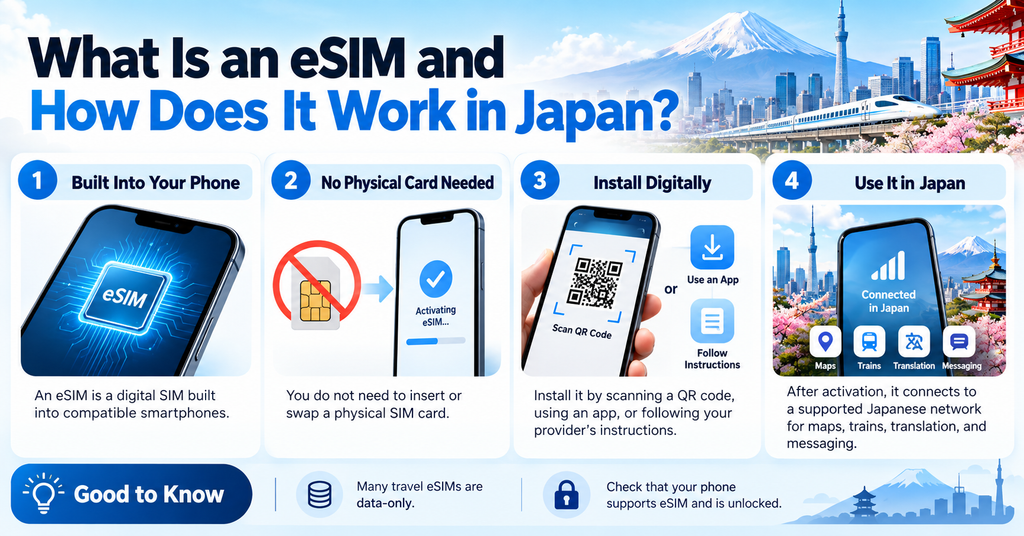
An eSIM is a digital SIM that is built into compatible smartphones and other devices.
Unlike a traditional SIM card, you do not need to insert a physical card into your phone. Instead, you usually install an eSIM by scanning a QR code, using an app, or following the instructions provided by your eSIM company.
For travelers in Japan, an eSIM can provide mobile data as soon as it is activated and connected to a supported Japanese mobile network.
This means you can use Google Maps, train apps, translation tools, messaging apps, and other online services while traveling around Japan.
Many travel eSIMs are data-only plans, so they may not include a Japanese phone number, regular voice calls, or SMS.
You can often keep your regular SIM active at the same time, depending on your phone and carrier settings.
Before buying a Japan eSIM, make sure your device supports eSIM and is unlocked for use with another mobile network.
Is a Japan eSIM the Best Option for Tourists?
A Japan eSIM is a convenient option for many international travelers, especially if you want mobile internet as soon as you arrive.
However, it is not always the best choice for everyone.
The right option depends on your phone, how much data you need, whether you are traveling alone or with others, and whether you need a Japanese phone number.
Before choosing an eSIM, it is helpful to compare it with a physical SIM card, pocket Wi-Fi, and international roaming.
Still comparing eSIMs, SIM cards, and pocket Wi-Fi? Check our complete guide to internet options in Japan.
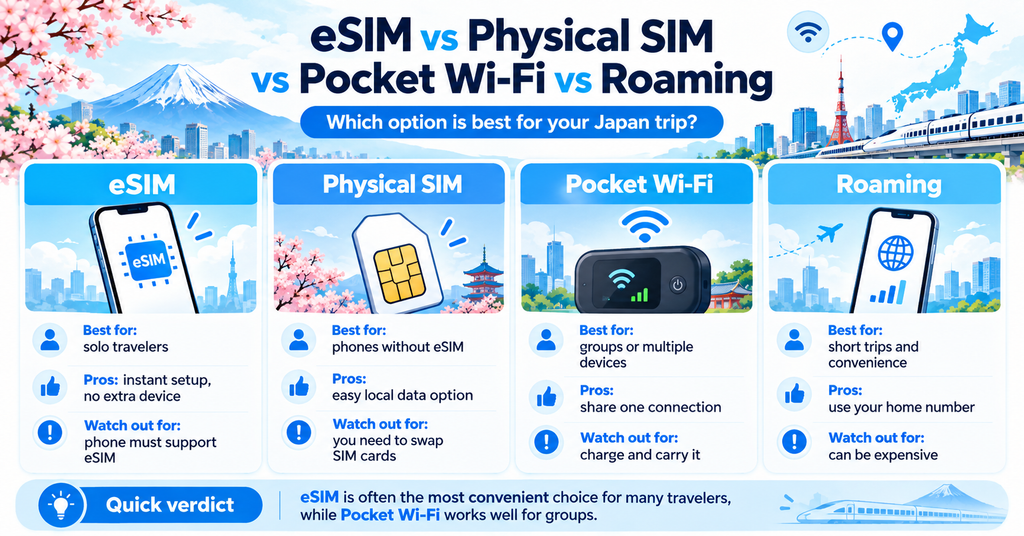
Japan eSIM vs Physical SIM
A Japan eSIM and a physical SIM card can both provide mobile internet during your trip.
The main difference is how they are installed.
An eSIM is installed digitally, so you do not need to remove your regular SIM card or visit a store to insert a new one.
A physical SIM card must be inserted into your phone, which can be less convenient if you want to keep your home SIM in the device.
An eSIM is usually easier for travelers who want to prepare before arriving in Japan.
However, a physical SIM may still be useful if your phone does not support eSIM.
Japan eSIM vs Pocket Wi-Fi
Pocket Wi-Fi is a small portable router that connects your phone and other devices to the internet.
It can be useful for families or groups because several devices can connect to the same Wi-Fi device.
However, you need to carry the router with you, keep it charged, and usually return it at the end of your rental period.
A Japan eSIM works directly on your smartphone, so there is no extra device to carry.
For solo travelers or travelers who mainly need internet on one phone, an eSIM is often more convenient.
For groups that want to share one connection, pocket Wi-Fi may be a better option.
Japan eSIM vs International Roaming
International roaming allows you to use your regular mobile plan while traveling in Japan.
It is often the simplest option because you do not need to install another SIM or eSIM.
However, roaming charges can be expensive depending on your mobile carrier and plan.
A Japan eSIM usually gives you a separate data plan for your trip, which can make costs easier to understand in advance.
Before traveling, compare your carrier’s roaming rates with the price and data allowance of a Japan eSIM.
What to Check Before Buying a Japan eSIM
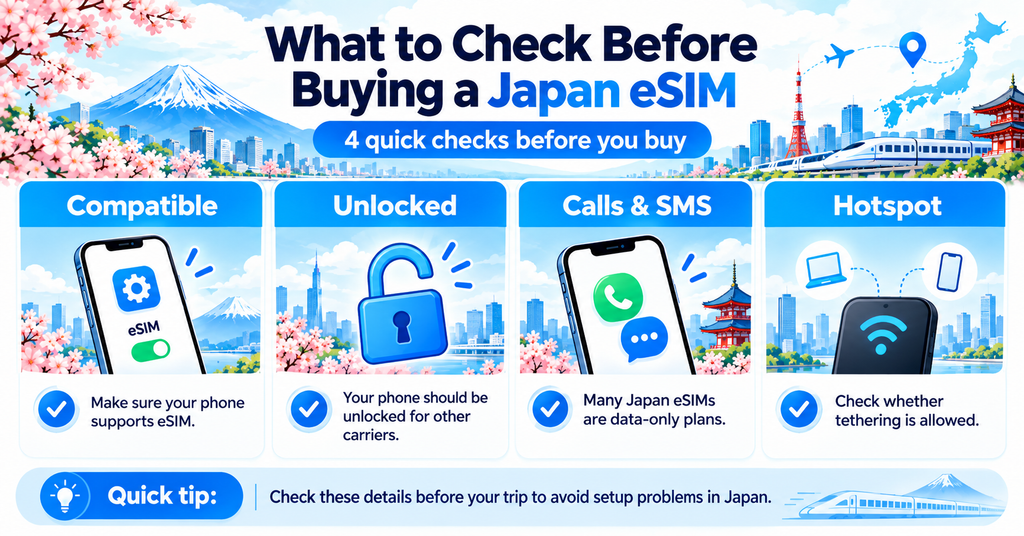
Before buying a Japan eSIM, check a few important things about your phone and the plan you are considering.
Not every smartphone supports eSIM, and some phones may still be locked to your home carrier.
You should also check whether the plan includes calls and SMS, and whether hotspot or tethering is allowed.
Checking these details before your trip can help you avoid connection problems after arriving in Japan.
Is Your Phone eSIM Compatible?
First, make sure your smartphone supports eSIM.
Many recent iPhone, Google Pixel, and Samsung Galaxy models support eSIM, but compatibility can vary depending on the model, country, and carrier.
You can usually check eSIM compatibility in your phone settings or on the manufacturer’s official website.
Before purchasing a plan, also check the eSIM provider’s list of supported devices.
If your phone does not support eSIM, you may need to use a physical SIM card or pocket Wi-Fi instead.
Is Your Phone Unlocked?
Your phone should normally be unlocked before you use an eSIM from another provider.
A carrier-locked phone may only work with the mobile company that originally sold or activated it.
If you are not sure whether your phone is unlocked, check your device settings or contact your mobile carrier before traveling.
Do this before buying your Japan eSIM, because an eSIM may not work properly on a locked device.
If you use an iPhone, Apple explains how to check whether your device is unlocked before using a travel eSIM.
Check Apple’s official guide to using an eSIM while traveling internationally.
Does Your Japan eSIM Include Calls and SMS?
Many travel eSIMs for Japan are data-only plans.
This means you can use mobile internet, messaging apps, maps, and other online services, but you may not receive a Japanese phone number.
Regular voice calls and SMS may also be unavailable.
If you need to make calls, receive SMS verification codes, or use a Japanese phone number, check exactly what the plan includes before buying it.
Apps such as WhatsApp, LINE, FaceTime, and other internet-based calling services can still work with a data connection.
Can You Use Hotspot or Tethering?
If you plan to connect a laptop, tablet, or another device to your phone, check whether your Japan eSIM allows hotspot or tethering.
Some eSIM plans allow tethering without restrictions, while others may limit it or apply separate data rules.
This can be especially important if you need to work during your trip or share your internet connection with another traveler.
Check the provider’s terms before purchasing the plan.
How Much Data Do You Need for Japan?
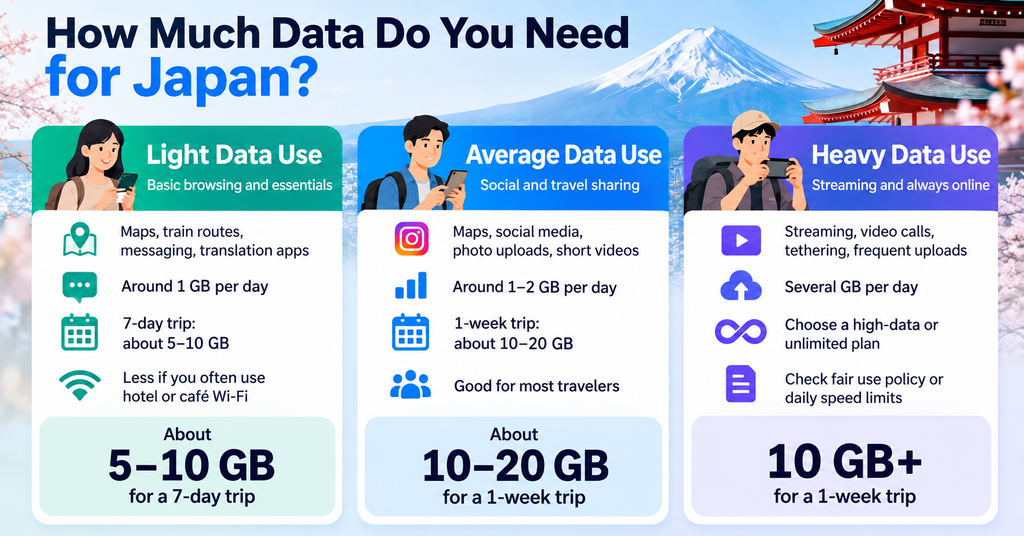
The amount of data you need in Japan depends on how you use your phone during your trip.
Using Google Maps, train apps, messaging, and web searches does not usually require a huge amount of data.
However, watching videos, uploading photos, using social media frequently, or tethering other devices can increase your data use quickly.
The following estimates can help you choose a suitable Japan eSIM plan.
Light Data Use
Light data users mainly use their phones for maps, train routes, messaging, translation apps, and occasional web searches.
For this type of use, around 1 GB per day is often enough for many travelers.
A 7-day trip may require around 5 to 10 GB, depending on how often you use mobile data.
If you regularly connect to hotel or restaurant Wi-Fi, you may use even less.
Average Data Use
Average data users may use maps and messaging throughout the day, browse social media, upload photos, and occasionally watch short videos.
Around 1 to 2 GB per day can be a comfortable amount for this type of travel.
For a one-week trip, a plan with around 10 to 20 GB may be suitable for many travelers.
Choosing a little more data than you expect to use can give you extra peace of mind.
Heavy Data Use
Heavy data users may stream videos, upload many photos or videos, make frequent video calls, or use hotspot and tethering.
These activities can use several gigabytes of data in a single day.
For heavy use, consider a high-data or unlimited plan.
Before choosing an unlimited plan, check whether the provider has a fair use policy or daily speed limit, because some plans may reduce your connection speed after heavy usage.
How to Choose the Best Japan eSIM
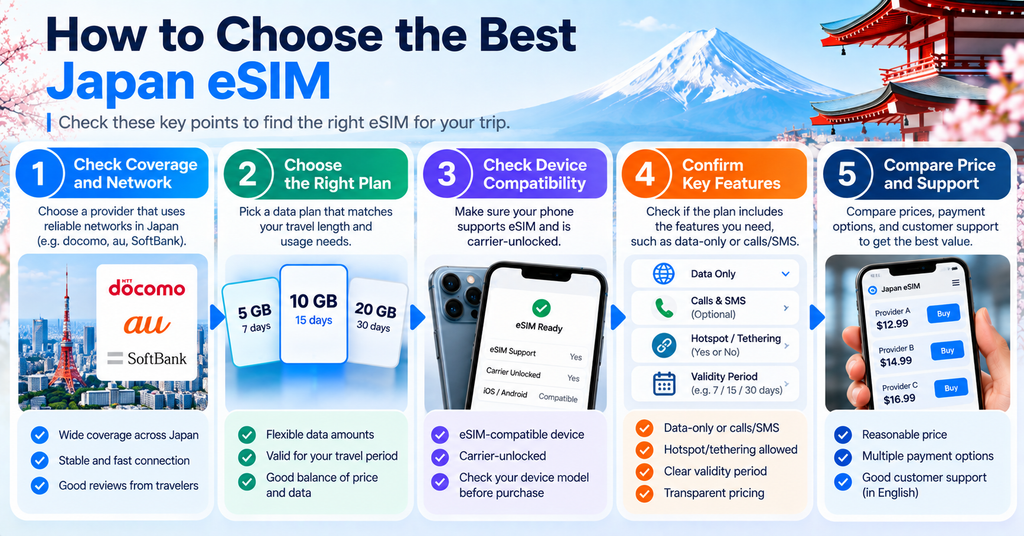
Choosing the best Japan eSIM is not only about finding the cheapest plan.
You should also compare the amount of data, validity period, network coverage, connection speed, and whether hotspot or tethering is allowed.
The best plan for you depends on the length of your trip and how you plan to use your phone in Japan.
Data Allowance
First, check how much mobile data is included in the plan.
Some Japan eSIMs provide a fixed amount of data, while others offer daily data limits or unlimited plans.
Choose a plan that matches your expected usage and trip length.
If you are unsure, selecting slightly more data than you expect to use can help you avoid running out during your trip.
Validity Period
Japan eSIM plans are usually valid for a specific number of days.
For example, a plan may be valid for 7, 10, 15, or 30 days.
Make sure the validity period covers your entire stay in Japan.
Also check when the validity period starts, because some plans begin when the eSIM is installed, while others begin when it first connects to a supported network in Japan.
Network Coverage
Network coverage is especially important if you plan to travel outside major cities.
Most travel eSIM providers use one or more Japanese mobile networks.
Before buying a plan, check which network the eSIM uses and whether coverage is available in the areas you plan to visit.
Coverage is usually strong in major cities such as Tokyo, Osaka, and Kyoto, but it can vary in rural, mountainous, or remote areas.
Speed and 5G
Some Japan eSIM plans support 5G, while others may mainly use 4G or LTE.
For most travelers, 4G is fast enough for maps, messaging, web browsing, and social media.
If 5G is important to you, check whether the plan supports it and whether your phone is compatible with the required network bands.
Actual speed can still vary depending on your location, network congestion, and the provider’s service conditions.
Hotspot and Fair Use Policies
If you plan to share your connection with a laptop, tablet, or another traveler, check whether hotspot or tethering is allowed.
You should also read the provider’s fair use policy.
Some unlimited plans may reduce your speed after heavy data usage or apply daily limits.
Checking these conditions before purchasing can help you avoid unexpected restrictions during your trip.
When Should You Buy and Install Your Japan eSIM?
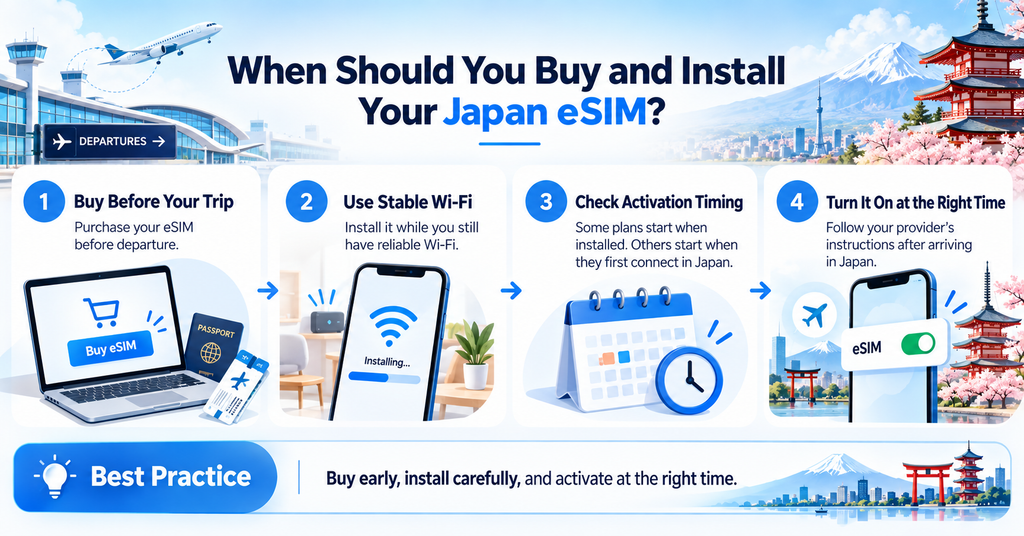
It is usually best to buy your Japan eSIM before your trip.
Buying it in advance gives you time to check the instructions, install the eSIM, and make sure your phone is ready before you arrive in Japan.
However, do not activate the eSIM too early.
The start time of the plan can vary depending on the provider. Some plans begin when the eSIM is installed, while others begin when the eSIM first connects to a supported network in Japan.
Before installing or activating your eSIM, check the provider’s instructions carefully.
A good approach is to purchase the eSIM before departure, install it while you still have a reliable Wi-Fi connection, and activate mobile data according to the provider’s instructions.
This can help you connect more smoothly after arriving in Japan.
How to Set Up a Japan eSIM
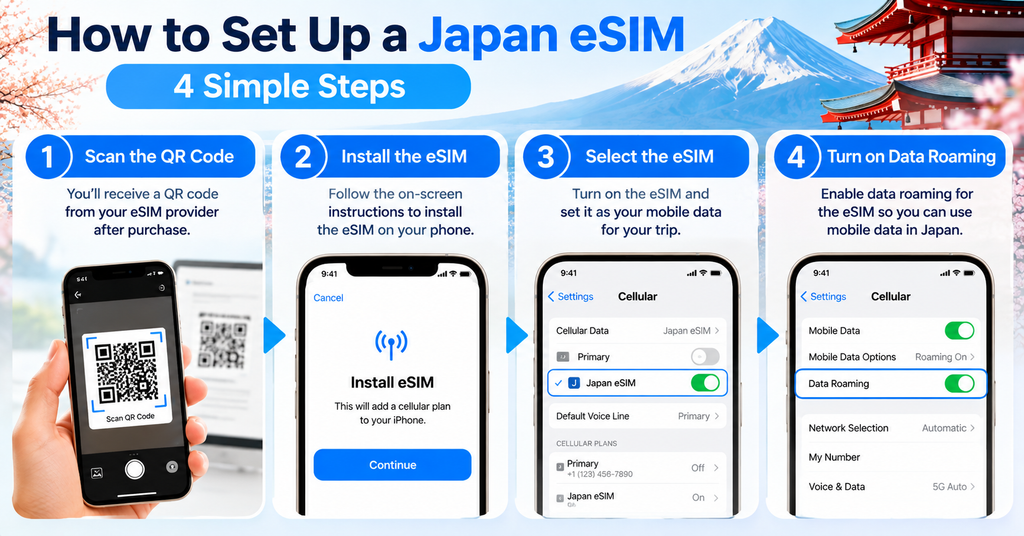
Setting up a Japan eSIM is usually simple, but the exact steps can vary depending on your smartphone and eSIM provider.
Most providers give you a QR code, activation link, or app after you purchase a plan.
Before starting, connect your phone to a stable Wi-Fi network and keep the installation instructions nearby.
It is also a good idea to give your Japan eSIM a clear label, such as “Japan Travel,” so you can easily distinguish it from your regular SIM.
How to Install a Japan eSIM on iPhone
On an iPhone, you can usually add an eSIM from the Cellular or Mobile Data section in Settings.
Depending on the provider, you may be able to scan a QR code, use a provider app, or enter the eSIM details manually.
After installation, give the new eSIM a clear label such as “Japan Travel.”
Keep your regular SIM as the default line for calls and messages if you still need it, and select the Japan eSIM for mobile data when you are ready to use it.
The exact menu names and options may vary depending on your iPhone model and iOS version, so follow the instructions provided by your eSIM company.
For detailed setup instructions, see Apple’s official eSIM guide for iPhone.
How to Install a Japan eSIM on Android
The setup process on Android depends on the phone manufacturer and software version.
On many Android phones, you can add an eSIM from the SIM, Mobile Network, or Connections section in Settings.
You may be asked to scan a QR code or enter information provided by your eSIM company.
After installation, label the eSIM clearly and choose it as your mobile data SIM when you are ready to connect in Japan.
Because Android menus can differ between Google Pixel, Samsung Galaxy, and other devices, always follow the instructions for your specific phone model.
Google provides official eSIM setup instructions for Pixel phones.
Samsung also provides official eSIM setup instructions for compatible Galaxy devices.
When to Turn On Data Roaming
Many travel eSIMs require data roaming to be turned on for the eSIM to connect to a local network in Japan.
However, you should follow your provider’s instructions because the required settings can vary.
Make sure data roaming is enabled for your Japan eSIM if your provider requires it.
At the same time, check that mobile data roaming is turned off for your home SIM unless you intentionally want to use international roaming.
This can help reduce the risk of unexpected roaming charges from your regular mobile carrier.
How to Use Your Japan eSIM After Arriving in Japan
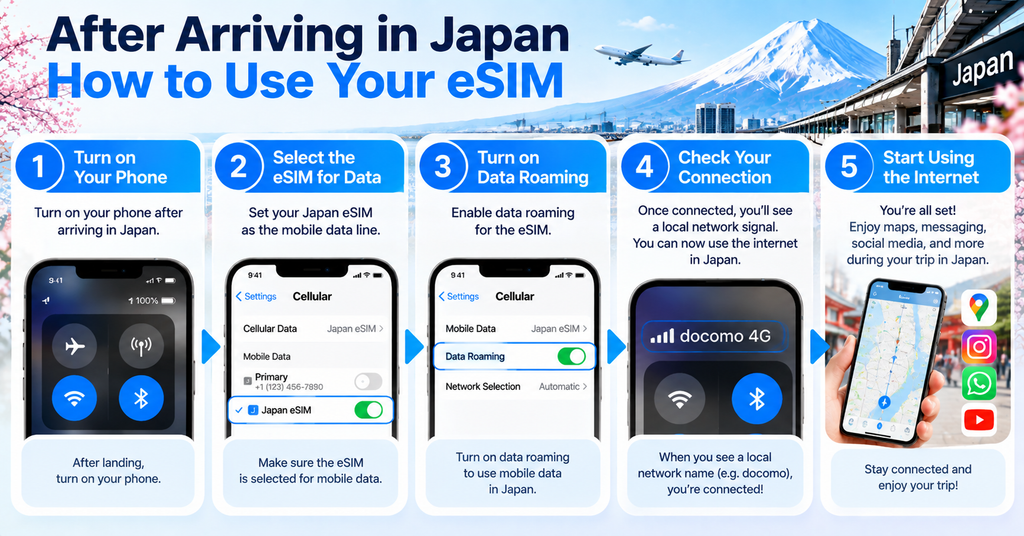
After arriving in Japan, turn on your Japan eSIM and select it as the mobile data line on your phone.
If your provider requires data roaming, make sure it is enabled for the Japan eSIM.
At the same time, check that your home SIM is not being used for mobile data unless you intentionally want to use international roaming.
Your phone should connect automatically to a supported Japanese mobile network, but it may take a short time after you arrive.
Once connected, test your internet by opening a map, website, or messaging app.
It is also a good idea to keep your eSIM provider’s setup instructions and support information saved on your phone in case you need them later.
If the connection does not work, restart your phone and check your mobile data, roaming, and APN settings before contacting the provider.
Mobile internet is especially useful for checking train routes and navigating stations in Japan.
Common Japan eSIM Problems and How to Fix Them
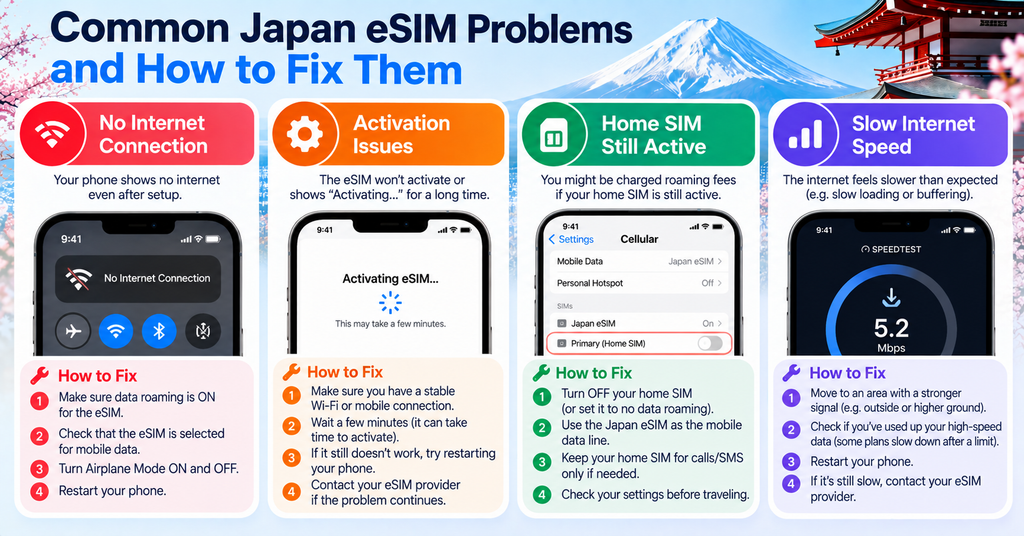
Even if your Japan eSIM is installed correctly, you may still experience connection problems during your trip.
Common issues include having no internet connection, problems activating the eSIM, accidentally using mobile data from your home SIM, or experiencing slow speeds.
In many cases, these problems can be fixed by checking a few basic settings on your phone.
If the problem continues, contact your eSIM provider and follow their troubleshooting instructions.
No Internet Connection
If your Japan eSIM shows a signal but you cannot access the internet, first check that mobile data is turned on.
Make sure your Japan eSIM is selected as the mobile data line and that data roaming is enabled if your provider requires it.
You can also try turning Airplane Mode on and off or restarting your phone.
If the connection still does not work, check the APN settings provided by your eSIM company.
eSIM Does Not Activate
If your Japan eSIM does not activate, check whether the activation period has started and whether you are following the provider’s instructions correctly.
Some eSIMs may only activate after connecting to a supported mobile network in Japan.
Make sure your phone is compatible with eSIM and unlocked for use with another provider.
If the eSIM still does not activate, avoid deleting it unless your provider tells you to do so, because some eSIMs cannot be installed again with the same QR code.
Mobile Data Is Using Your Home SIM
If your phone is using mobile data from your home SIM instead of your Japan eSIM, check your mobile data settings.
Select your Japan eSIM as the default line for mobile data.
You should also turn off data roaming for your home SIM unless you intentionally want to use your carrier’s international roaming service.
On some phones, you may also need to turn off automatic mobile data switching to prevent the phone from changing between SIMs.
Internet Is Slow
Slow internet speeds can happen because of network congestion, weak coverage, location, or the conditions of your eSIM plan.
Try moving to a different area, turning Airplane Mode on and off, or restarting your phone.
If you are using a plan with a fair use policy, your speed may also be reduced after heavy data usage.
Check your provider’s terms to see whether speed limits or daily data restrictions apply.
Can You Keep Your Home SIM Active with a Japan eSIM?
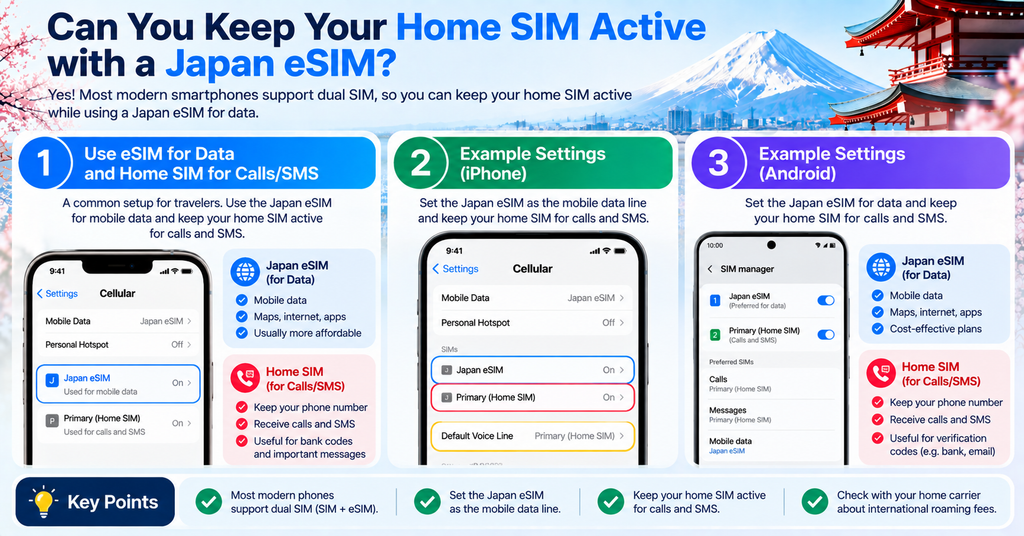
Yes, many smartphones allow you to keep your home SIM active while using a Japan eSIM for mobile data.
This can be useful if you want to keep receiving calls, messages, or verification codes on your usual phone number while using the Japan eSIM for internet access.
To reduce the risk of unexpected mobile data roaming charges, set the Japan eSIM as your mobile data line and turn off data roaming for your home SIM unless you intentionally want to use your carrier’s international roaming service.
You should also check whether your phone has automatic mobile data switching enabled, because this may cause your phone to use the home SIM if the Japan eSIM connection becomes weak.
The exact dual-SIM settings vary by phone model and carrier, so check your device settings and your mobile provider’s instructions before your trip.
Japan eSIM FAQ
Here are some common questions travelers have about using a Japan eSIM.
The answers below cover phone numbers, messaging apps, calls, buying an eSIM after arrival, using one eSIM on multiple devices, and coverage outside major cities.
Do I Need a Japanese Phone Number?
Most travelers do not need a Japanese phone number for everyday sightseeing.
A data-only Japan eSIM is usually enough for maps, train apps, restaurant searches, translation, messaging, and other online services.
However, some services in Japan may require a Japanese phone number for registration or verification.
If you know you will need local calls or SMS, choose a plan that includes a Japanese phone number.
Can I Use WhatsApp, LINE, and iMessage?
Yes, you can usually use WhatsApp, LINE, iMessage, and other internet-based messaging apps with a Japan eSIM.
These apps use mobile data, so a data-only eSIM is usually enough.
Keep in mind that some services may still use your regular phone number for account verification or registration.
If your home SIM remains active, you may still be able to receive verification messages depending on your carrier and roaming settings.
Can I Make Phone Calls with a Japan eSIM?
It depends on the eSIM plan.
Many travel eSIMs for Japan are data-only and do not include regular voice calls or a Japanese phone number.
You can still make internet-based calls using apps such as WhatsApp, LINE, FaceTime, or other calling services.
If you need traditional phone calls, check whether the eSIM plan includes voice service before purchasing it.
Can I Buy an eSIM After Arriving in Japan?
Yes, you can usually buy a Japan eSIM after arriving in Japan.
However, you will need an internet connection to purchase and install it.
Using airport Wi-Fi, hotel Wi-Fi, or another reliable connection can make the setup process easier.
For convenience, many travelers prefer to buy and prepare their eSIM before departure.
Can I Use One eSIM on Multiple Devices?
In most cases, an eSIM is installed on one compatible device.
You usually cannot install the same eSIM on multiple phones at the same time.
If you want to connect another device, check whether your plan allows hotspot or tethering.
For families or groups using several devices, pocket Wi-Fi may sometimes be more convenient.
Do Japan eSIMs Work Outside Tokyo, Osaka, and Kyoto?
Yes, many Japan eSIMs can work throughout the country.
However, coverage and speed can vary depending on the mobile network used by the eSIM, your location, and local conditions.
Major cities usually have strong coverage, while some rural, mountainous, island, or remote areas may have weaker signals.
Before buying an eSIM, check which Japanese mobile network it uses and review the coverage map if you plan to travel outside major cities.
Final Tips for Using an eSIM in Japan
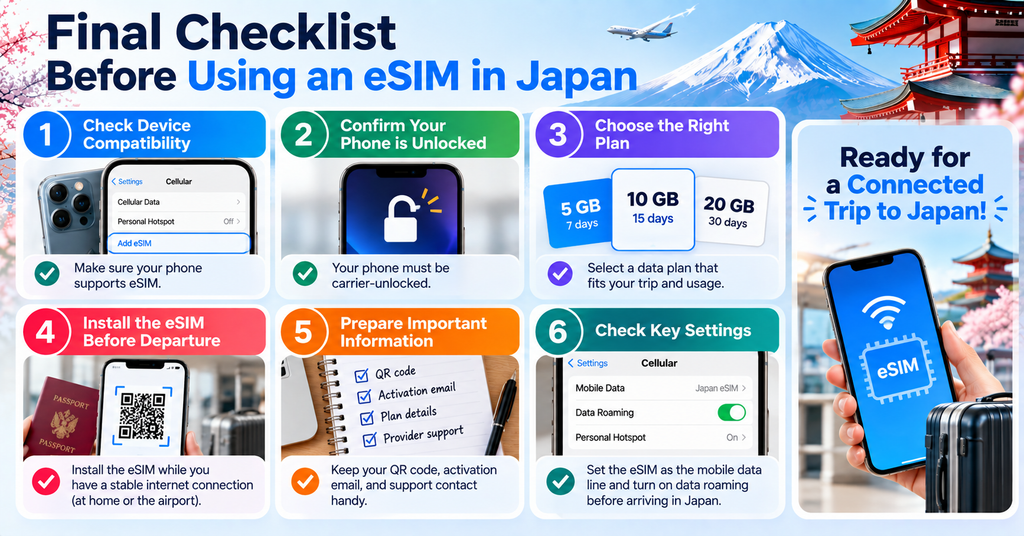
Using a Japan eSIM can make your trip much easier by giving you mobile internet for maps, train routes, translation, messaging, and travel information.
Before your trip, make sure your phone supports eSIM and is unlocked.
Choose a plan that matches your trip length, expected data usage, and whether you need hotspot, calls, or SMS.
Buy your eSIM early enough to review the setup instructions, but check when the plan becomes active before installing or turning it on.
After arriving in Japan, select the Japan eSIM for mobile data and check your roaming settings carefully.
It is also a good idea to save your eSIM provider’s instructions and support information offline in case you have connection problems.
With the right setup, a Japan eSIM can be a simple and convenient way to stay connected throughout your trip.
Visiting Japan for the first time? Check our complete guide to preparing for your trip.